Tuesday, August 16, 2011

When do the kids come??


I hate to wish summer away, but seriously, I'm ready to get this tech show on the road!
I've tried to make time this week relax but keep finding myself coming back to thoughts of what I want to accomplish this year with my students, how I want my model technology classroom to function, and how I envision embedding different tech tools and learning styles into my classroom.  I wish I could say I answered all these questions, but I think I've only begun to scratch the surface. C'est la vie!  When faced with the many other tasks that seem to come out of the woodwork this time of year, I've come to conclude that some of these answers will come after the kids show up and I know what their learning styles are and what experience(s) they will bring with them. 

Our Information Technology Vision Statement

I spent time reviewing my district's technology vision statement and am confident that I am on the right track with what I am envsioning for my kiddos. Despite having the youngest learners of all the model technology classrooms, I envision technology integration and 21st century learning skills to be a crucial part of my curriculum. I am bound and determined to show that even 1st graders can effectively and productively utilize these tools, albeit with a bit more guidance and structure. My learners are digital natives to the core and it is my job to adapt my teaching to their learning. I by no means want the extent of our tech integration to be only app based. 

Here's looking forward to a year of technology, adventure, trial and error, excitement, fun, growth, reflection, and lots of learning! Let the journey begin!


Thursday, August 4, 2011

more tech

Another day of tech training.... our morning has been packed full of investigating different sites. In the past hour I've learned about Jaycut, Advanced image searches in Google, creative commons, catch.com (cool! Can't wait to start using at conferences and meetings), Skype in the classroom, splicd.com and more. It is amazing to me how many WONDERFUL resources are out there that I didn't know about.
We are now working to compose a letter to the parents of students in our model technology classrooms to let them know what their children's learning environment will be like. It is an interesting endeavor as our rooms and how they function and the devices and tools that we use are all so different. The 5 model tech rooms in our district include: my 1st grade room with multiple devices, a 5th grade room with multiple devices, a 7th grade Lang. Arts class which will utilize a class set of web-based netbooks, an 8th grade Math class which will utilize a class set of iPad 2's and a high school Spanish class which will utilize a class set Xoom tablets

Tuesday, August 2, 2011

And the journey begins...

This week I am attending a professional learning academy with other teachers interested in integrating technology in the classroom as part of my model technology classroom journey. It has been a very exciting and yet mind boggling couple of days all wrapped into one. I have been blown away more than once with the knowledge of the people I am attending with. It has definately been a time of growth and reflection.

One of my model tech classroom colleagues summed it up very well yesterday...
Techno-overload!

Yep, that's about right... Summer brain has had to go out the window in a hurry to keep up with all of the information that we have had thrown at us!

One of the presenters shared this wonderful Technology Integration Matrix

The matrix illustrates how teachers can use technology to enhance learning for K-12 students. The matrix shows the five levels of technology integration (entry, adoption, adaptation, infusion, and transformation) along with the five characteristics of meaningful learning environments (active, collaborative, constructive, authentic, and goal directed). Each of the 25 cells also includes a math, science, social studies, and language arts video example to illustrate the integration. The videos cover a variety of grade levels including K-2.

Watching some of these videos has my head spinning as to how I can move my teaching along this continuum with our youngest learners. I am bound and determined for my model technology classroom to not be all about "the apps" but rather for it to be a learning environment in which technology is embedded seamlessly into our curriculum as often as possible. Yes, the apps will be there and have their place in our day, but there is so much more out there that even firsties are capable of doing.

I'm looking forward to starting this journey and sharing with you along the way. Stay tuned for details....

Monday, August 1, 2011

New teacher inservice

We have 43 new teachers starting in our district this year! WOW!

I have been asked by our director of curriculum to be part of a technology panel to show and share how I am using 21st tools to reach and teach my young, 21st century learners. Cool! What a great way to get our new staff thinking about how they can incorporate these skills into their teaching!

Sunday, July 24, 2011

Dance Mat Typing

I bookmarked this site some time ago and finally got the chance to check it out in a bit more detail. I have been using Keyboard Climber with my 1st graders to help them learn where the letters are on the keyboard. They love it and it's been a great starter site. Click here to see a previous post.

Dance Mat Typing from BBC School is listed as being an introduction to touch typing for children aged 7 - 11.  I really like it as the next step as it takes keyboarding to the next step.


Kiddos work through 4 levels each of which is divided into 3 stages. Here is what Level 1 looks like:
Stage 1: f d s a j k l ; g h - home row
Stage 2: e i
Stage 3: r u


To see what each of the other levels entail click here.

  On the left you can see screen shots of several of the pages in level 1. As you can see in the last screenshot, kiddos are already practicing whole words not just isolated letters as they move through level 1.

I'm excited to have my kiddos try this site. I still plan to start with Monkey Climber but am thinking I will likely introduce this site around January.

Friday, July 22, 2011

ahhh.... a feeling of accomlishment


It's done, it's finally done!
Before...
Remember this picture? Uuugghh!!!  Talk about an overwhelming feeling of dread as I had to pack up my old room. The picture above shows what a disaster it was, not to mention a rude awakening to how much stuff one person can accumulate. Although most of "the stuff" still came with me, I did purge as I packed and ended up putting out plenty of "freebies" for the next pack-rat to enjoy!   It took much longer than I anticipated, but everything is finally moved, unpacked, and even mostly set up!!

Now for the transformation....
Drum roll please...

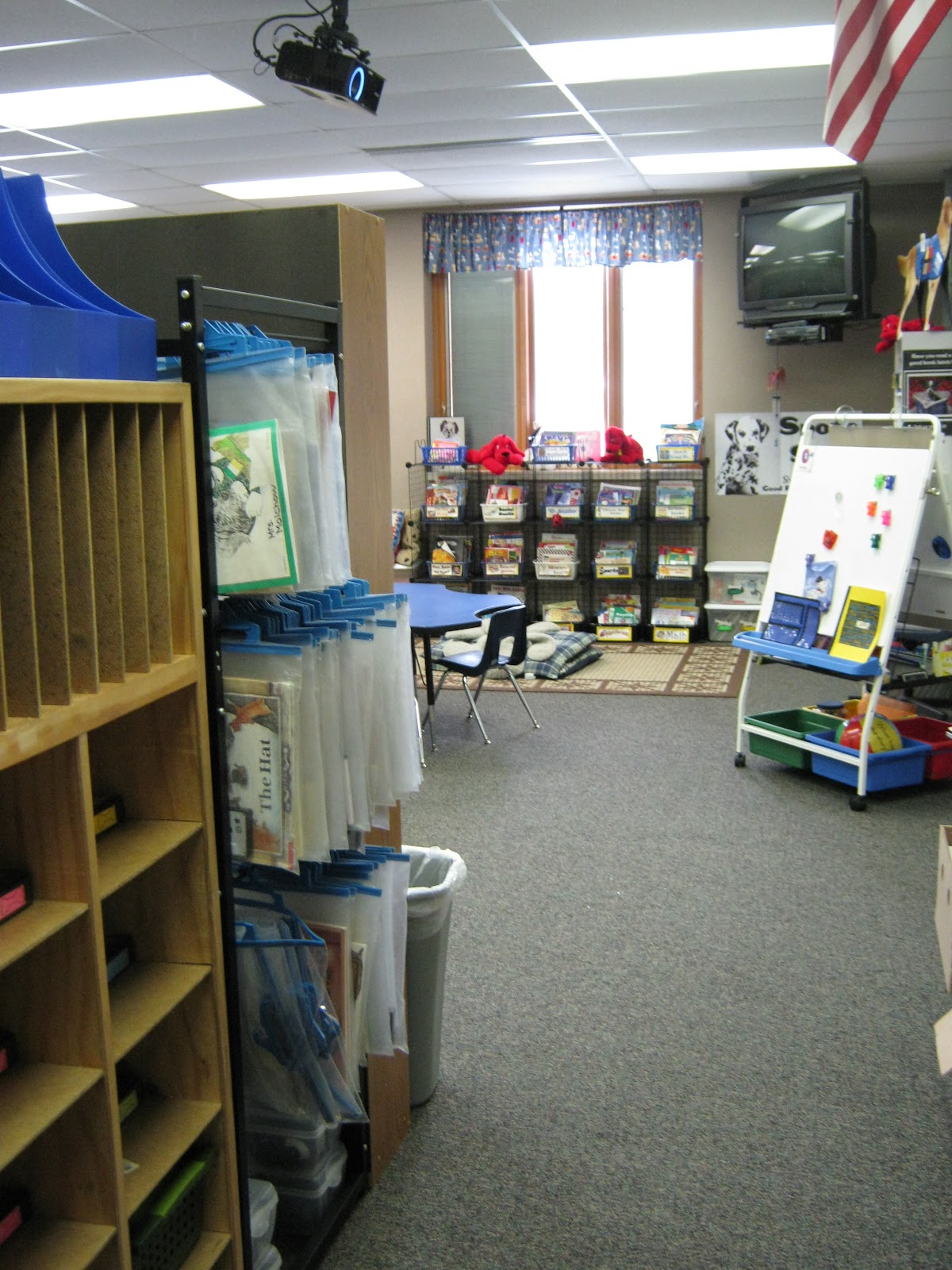
Here is the new and improved room. This picture shows what you see as you first walk in the door. My kiddos cubbies and my Listen to Reading rack are on the left to create a hallway into the room. As you move past the hallway you can see the main part of the room. My classroom library snakes in and out over the majority of one wall. My teacher desk is hidden behind several bookshelves. If you look carefully you can see it in the top left hand corner of the picture below.  I'll have to take and post a few more pics of the other 1/2 of the room- that's where my Work on Writing area is as well as my guided reading area, word wall, CAFE board and more. I really like the way the room turned out and although I miss my old room, this room seems to be brighter and more organized (cupboards are a wonderful thing!) 
Now I just have to hope that the room will flow once the kiddos arrive. I did a lot of preplanning as to where things should go so that movement in the room will flow and I hopefully won't find myself rearranging after the first few weeks of school.