Showing posts with label Seesaw. Show all posts

Sunday, March 7, 2021

Malchow's Tech Bytes ~ March 8th ☘️

 Hi all! I'm excited to share that my weekly Tech Bytes is back up and running!  Thank you for being patient as I took some time away due to my dad's illness. My dad was diagnosed with pancreatic cancer in late October and mid-January we found out that continued treatment was no longer an option. With that news, my siblings and I rallied together to help take care of my dad for whatever time he had left. Unfortunately, from the time we found out until the time of his passing was less than a week. It's been a rough few months of many ups and downs as we are all learning to live in this new normal of dad not being around and helping mom to navigate unchartered territory. There has been a lot of soul searching and reflecting on the importance of family and work/life balance over the past couple of months and while my intent is not to write a novel or get too preachy, I will simply say, that life is too short... enjoy all of the moments you have with your loved ones.

With that said, I am working to get back in the swing of things and to keep the weekly newsletter and monthly EpicPals projects running. Thank you so much for sticking with my through this difficult time and for helping me to get through this time with your continued support, emails, texts and kindness! It has been soooo much appreciated!!! 

Click image above to view larger and access the links


Sunday, November 8, 2020

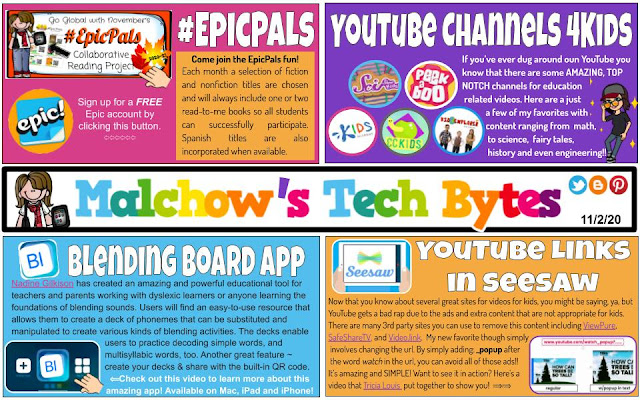
Sunday, November 1, 2020

Sunday, October 18, 2020

Malchow's Tech Bytes πŸ‘©πŸ»‍πŸ’»~ 10/19

Click the image above to access the links and view the deck in a larger format.

Just a reminder that #EpicPals is now up and running! Want more information? Click on the EpicPals tab at the top of this page.

Saturday, October 3, 2020

Malchow's Tech Bytes πŸ‘©πŸ»‍πŸ’» ~ October 4th

 Week 2 of CrAzY~ my 2nd building was informed last Sunday afternoon that we were shutting down and moving to virtual Monday morning. On Monday, we found out the entire district was shutting down as of Wednesday and moving to virtual (as had the majority of districts around us). Needless to say, WI is not in a good position right now and the sad realization is that the cases are not coming from the schools, it's community levels that are shutting us down. We are tentatively down for 3 weeks and crossing our fingers that we'll be back in our buildings with kids at that time. 🀞🏼🀞🏼🀞🏼🀞🏼🀞🏼🀞🏼🀞🏼🀞🏼🀞🏼🀞🏼🀞🏼🀞🏼 (Everything crossed!) 

I hope there are some tips and tricks that you will find useful this week for whatever environment you are currently teaching in.

To access the links and view the deck in a larger format, click the image above.

Saturday, September 26, 2020

Malchow's Tech Bytes~ Sept 28th

It's been a busy week to say the least. One of my elementary buildings had to move to virtual learning this week while my other building is still meeting in person for the time being. In addition to supporting teachers in various ways this week, I also had the opportunity to sub in a kindergarten classroom. This week's Seesaw corner is for all of my kindergarten friends. 

To access the links & view the deck in a larger format, click the image above

Sunday, September 20, 2020

Sunday, April 12, 2020

Malchow's (Virtual Learning) Tech Bytes

Whew! What a CrAzY MONTH it has been!

 I feel like I need to say that 10 times to get my point across, but my guess is that if you're reading this, I'm likely preaching to the choir! LOL  I've been on overdrive since March 13th when I was at a regularly scheduled Apple Core PD planning day. The day seemed to start normally with a bit of talk about what was going on in the world and that nasty 5 letter word, COVID, but within an hour, normal turned into disbelief as we found out that a school closing was likely imminent. At that point, our team shifted gears and spent the remainder of our day planning for how and when we would train staff in virtual learning. From there, the wheels just kept on spinning. There have been days that I'm not sure if I'm coming or going and the amount of hours I have put in have been extraordinary. My family's spring break ski trip to Colorado was cancelled and I spent the majority of that break planning, prepping and creating for teachers, students and parents. Needless to say, my normally scheduled projects such as my weekly Tech Bytes and monthly EpicPals projects have taken a back seat, not because I wanted them to, but simply because there hasn't been a spare hour in the day to work on them. 

My hope is that things will calm down a little in the next week or two (I keep saying that, but it has to happen, right?!?) and that I will be able to find a better balance of working from home and supporting my middle school & high school sons with their remote learning while also keeping my own sanity knowing that my husband is working on the frontline as a captain for the fire department and riding the rescue squad each shift. The threat of COVID is very real for my family and although we have a plan and will cross each bridge as we get to it, the possible scenarios honestly scare the he** out of me.... 'nuf said.

So, back to that balance.... over the course of the last week, I've revamped my normal Tech Bytes to take on a new objective and that is to support my K-5 teachers with our main technology initiatives (Seesaw and Google Meet). Rather than create two newsletters, I'm going to share pieces of what I am creating for my district teachers with you. I hope there will be things that you will find useful as you also navigate these unchartered waters. 

Please feel free to reach out if you have any questions!
~ Sara

Click Image to access the slide deck

Sunday, April 5, 2020

Using Bitmojis as Virtual Stickers for Feedback πŸ™‚

A+I LOVE Bitmojis!!! 

Did you know that you can use your Bitmoji as virtual stickers in Seesaw? What a fun and easy way to leave feedback on your students' work!  There are SO many, great, kid appropriate images that you can use, and lot of new images too, like the one to the right!

View the video below to find out how to easily add these to your students' work in Seesaw!


Oh and guess what?

Side note: 
The Chrome Extension makes adding your Bitmoji SUPER DUPER easy, however, if you don't have the extension, you can still easily add your Bitmoji by saving the image to your download folder or desktop on your computer, OR by saving it to your Photos on an iPad. Then follow the same directions as the video shows, but use the upload tool on the left to bring your images onto the students' paper.

Monday, March 23, 2020

Remote Learning~ Learn to Code Choice Board

Here's another Choice Board that your students may enjoy during your school's remote learning timeframe. You'll find a Dr. Seuss choice board that I created in this post

The top row of this choice board would be appropriate for the primary grades while the remainder of the board will likely be more appropriate for the upper grades and students that have an interest in coding. 


**Please Note: The CS First sites (Create a Google Logo, Animate a Name, Code your Superhero) require students to enter a code to access. To get a code, you need to set up a free account. It's super easy & takes less than 5 minutes (I promise!). Once it's set up, your students will simply  enter your code. There's nothing more you will need to do unless you want to track their progress on the dashboard. I've included a video below to show you how to set up your acct.
Click image to access and download this file

For the links to be live, the board which is saved as a pdf, needs to be uploaded as a file, NOT as a link in Seesaw. You'll need to download the file first (click the image to access the file and download) then, watch the embedded video below for directions on how to make it work in Seesaw.


** Please know that sharing settings for all documents are set to Open by Anyone with the Link. **
If you are being asked to request access, please check with you IT department 
as the message below is what I get when trying trying to give you access.


Monday, December 2, 2019

Malchow's Tech Bytes πŸ‘©πŸ»‍πŸ’»~ December 2nd~ Hour of Code Edition ⏰πŸ“±

Sorry for the late arrival of this week's newsletter. Our most recent snowstorm here in WI messed with my internet and made if difficult if not impossible to upload files last night so I'm playing catch up tonight with my newsletter and EpicPals. Thanks for your patience and understanding!

This week's Tech Bytes has resources for next week's Hour of Code/Computer Science Week. I hope by having these resources a week in advance will give you a chance to investigate and plan something for your students!
Click image to access clickable links

Monday, September 2, 2019

Malchow's Tech Bytes~ Sept 2nd, 2019 πŸŽ‰πŸ“±πŸ‘©πŸ»‍πŸ’»

Welcome back to another great year of tips, tricks, resources and integration ideas! I hope that you'll find this year's Tech Bytes weekly newsletter valuable as you look for meaningful integration ideas for your classroom! Click the link below the image to access the file.
If you have any questions, please don't hesitate to get in touch with me!
~Sara (@smalchow)

Malchow's Tech Bytes!~ Sept 2nd 

Interested in having Tech Bytes delivered to your inbox each week? Sign up below.

Sunday, November 26, 2017

Hour of Code 2017

Is your class participating in the Hour of Code next week? Not sure what it's all about? Check out the video below and then commit to having your class take part next week.  


Ready to jump in? Try a one hour tutorial designed for ALL ages in over 45 languages!! My first graders loved taking part in the Hour of Code and really enjoyed working through the Minecraft activity. (The one on the Code.org website has been updated and is now listed for grades 2+). 


If you're not familiar with coding, DON'T let it hinder you from giving your students a chance to try it. You'll be surprised at what your students will figure out on their own. You may even be surprised at which of your students grasp the concepts right away. It never ceased to amaze me how some of my struggling students were the ones that excelled at coding. What a wonderful opportunity for ALL students to experience growth mindset, critical thinking, and problem solving... all while opening doors to their futures. 

Check out this week's Tech Bytes newsletter for a variety of resources to get you going. Who knows, you may decide that you'll even want to continue beyond next week! If that's the case, Code.org has a wonderful, FREE curriculum that you can use. Check out the Beyond an Hour of Code website.

Malchow's Tech Bytes~ Hour of Code Edition

Still wondering why you should invest in the time to teach coding? Check out the 10 reasons below by Brian Aspinall.