Sunday, July 24, 2011

Dance Mat Typing

I bookmarked this site some time ago and finally got the chance to check it out in a bit more detail. I have been using Keyboard Climber with my 1st graders to help them learn where the letters are on the keyboard. They love it and it's been a great starter site. Click here to see a previous post.

Dance Mat Typing from BBC School is listed as being an introduction to touch typing for children aged 7 - 11.  I really like it as the next step as it takes keyboarding to the next step.


Kiddos work through 4 levels each of which is divided into 3 stages. Here is what Level 1 looks like:
Stage 1: f d s a j k l ; g h - home row
Stage 2: e i
Stage 3: r u


To see what each of the other levels entail click here.

  On the left you can see screen shots of several of the pages in level 1. As you can see in the last screenshot, kiddos are already practicing whole words not just isolated letters as they move through level 1.

I'm excited to have my kiddos try this site. I still plan to start with Monkey Climber but am thinking I will likely introduce this site around January.

Friday, July 22, 2011

ahhh.... a feeling of accomlishment


It's done, it's finally done!
Before...
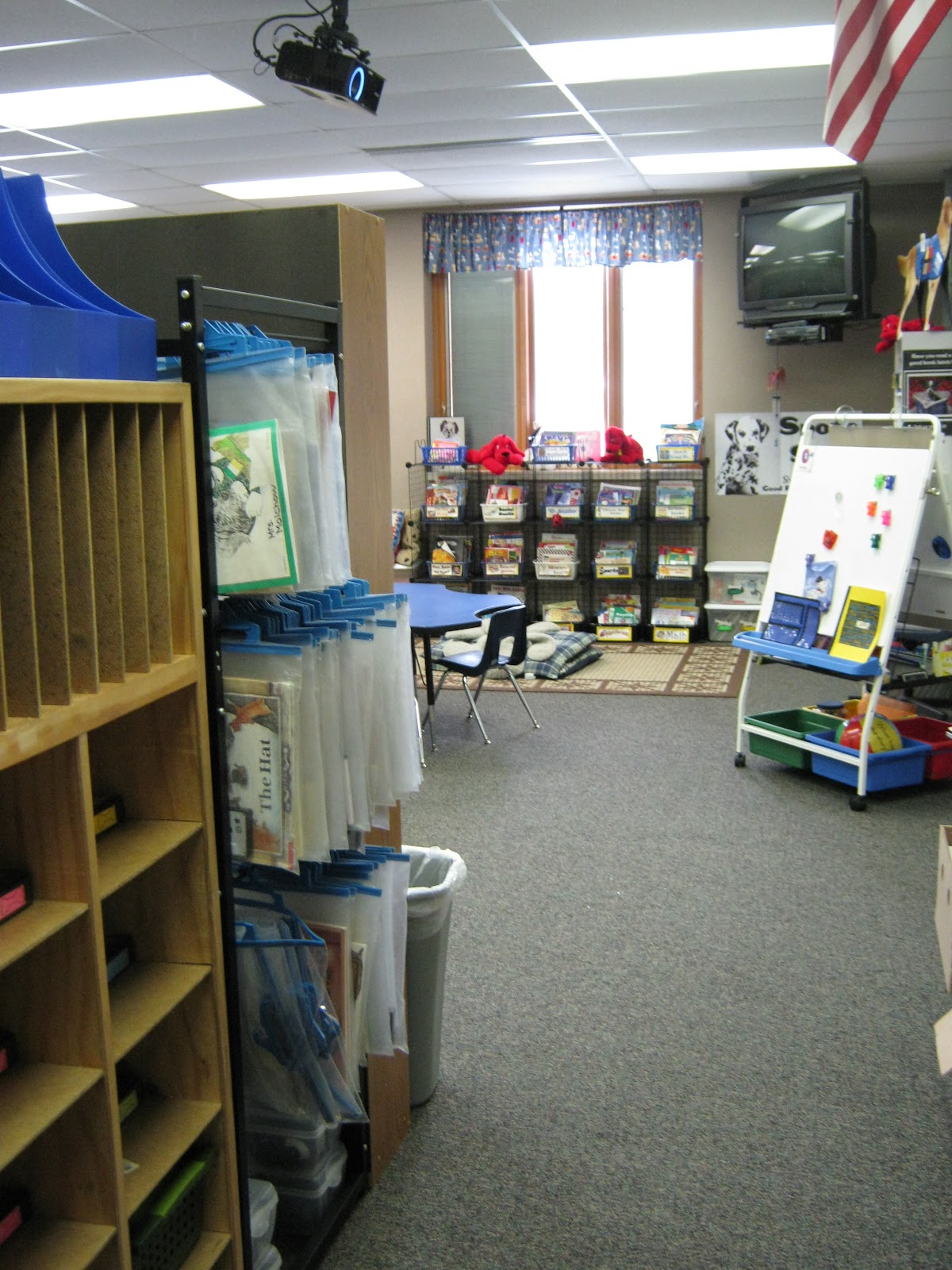
Remember this picture? Uuugghh!!!  Talk about an overwhelming feeling of dread as I had to pack up my old room. The picture above shows what a disaster it was, not to mention a rude awakening to how much stuff one person can accumulate. Although most of "the stuff" still came with me, I did purge as I packed and ended up putting out plenty of "freebies" for the next pack-rat to enjoy!   It took much longer than I anticipated, but everything is finally moved, unpacked, and even mostly set up!!

Now for the transformation....
Drum roll please...

Here is the new and improved room. This picture shows what you see as you first walk in the door. My kiddos cubbies and my Listen to Reading rack are on the left to create a hallway into the room. As you move past the hallway you can see the main part of the room. My classroom library snakes in and out over the majority of one wall. My teacher desk is hidden behind several bookshelves. If you look carefully you can see it in the top left hand corner of the picture below.  I'll have to take and post a few more pics of the other 1/2 of the room- that's where my Work on Writing area is as well as my guided reading area, word wall, CAFE board and more. I really like the way the room turned out and although I miss my old room, this room seems to be brighter and more organized (cupboards are a wonderful thing!) 
Now I just have to hope that the room will flow once the kiddos arrive. I did a lot of preplanning as to where things should go so that movement in the room will flow and I hopefully won't find myself rearranging after the first few weeks of school.

Tuesday, July 19, 2011

The Global Read Aloud Project

I  found out about the Global Read Aloud project today on Erin Klein's blog, Kleinspiration.
Here's what she had to say....

"The second annual Global Read Aloud is starting September 19th, 2011!  You won't want to miss out.

Classrooms around the world  working in international 'book clubs' to discuss what they are reading.  The project will run for four weeks.

 This year's selected books are Flat Stanley Books by Jeff Bown for younger students and Tuck Everlasting by Natalie Babbitt for older students.

 Collaborative efforts can be as simple or as multifaceted as you choose.  Some classes will be connecting electronically through Edmodo, Skype, classroom blogging pages, as well as an international wiki.  Other classes may select a more 'Flat Stanley' approach and use handwritten mail.

The options are endless. What an authentic and exciting experience for your students this fall!

To sign-up for this year's Read Aloud check out http://globalreadaloud.blogspot.com/  and for more ideas and making connections  http://globalreadaloud.wikispaces.com/.

Monday, June 20, 2011

WoW! Cool! Holy Cow!

WoW~ I am so excited. I found out tonight that I won a free license for Camtasia Studio from Kleinspiration's Tech-Tastic Give-away ~a $299 value!

Camtasia is a Screen Recording and Video Editing Software that is super easy to use. My mind is already swimming with ways that I can incorporate this into my teaching and curriculum this fall. Do any of you use this software? If so, how have you used it in your classroom? I'd love to hear your ideas!

A BIG thank you again to Erin from Kleinspration for this tech-tastic opportunity!!

QR codes

Have you ever heard of QR codes? If your like many of the people I've talked to lately, probably not, but I’ll bet you’ve probably seen them. 

qrcode
 QR codes or  Quick Response Codes are two-dimensional barcodes, readable by QR scanners, mobile phones with a camera, and smartphones. When you scan the image with your mobile device, it instantly gives you the information contained in that code. They work similar to a barcode, but you can encode a variety of information including web url's, text, phone numbers, etc.

To create a QR code try http://qrcode.kaywa.com/  This is the site that I've been using and it is super easy to use! Click on the link above, or scan the QR code on the left to go to the site.

So I've been doing a lot of thinking on how I can use QR codes as part of my model technology classroom next year as I will have 2 iPads with cameras as well as my personal 4th gen iPod touch. I want to give my class a little taste of tech on the first day that won't require a lot of thought or effort on their part sooooo... I've decided to do our beginning of the year school tour using QR codes.


Since I have a dog theme I'm going to have a dog give us our clues. I'll generate a QR code for each clue and place it in a speech bubble. I'm hoping to laminate these so I can use them from year to year. I have to try that out to make sure the QR reader will still work with the laminating film. I suspect it will, but would hate to do all of them only to find out that it doesn't.
I am also going to put a number on each dog and then make a master clue list with each number and what the clue is so that I will be able to easily remember where each dog takes us without having to scan each dog as I put it up around the building. I think this will be a fun and unique way for us to do our tour and will give my class a taste of tech. My intent is to have enough clues for each child in my class to be able to scan at least one dog.

 
I also found this site with several other ideas. I really like idea #2.

Interactive Back to School Night: Post QR codes throughout the classroom, with titles about various student work. QR codes could access student videos, projects, blogs, and many other ideas only teachers can envision. Hand out devices (iPod Touches, for instance) to parents who don’t have a mobile device and show them how to read the QR code and access the materials

My only concern is, how do I manage the iPads so that they don't walk off. Open House and/or parent-teacher conferences are always so crazy. Hmmm.. something to ponder. Any ideas?

Have you seen this video on 21st Century Education?

This is an awesome video from the New Brunswick Department of Education which our technology director showed to us at one of our committee meetings recently. It really hit home for me and makes me all the more excited to be one of the model technology classrooms for our district.

I'd love to know your thoughts after you view the video.